Out now on the App Store and Google Play

Keep books,
not receipts.

Expenseum turns everyday spending into clean, shareable books — with budgets, split bills, receipt scanning and an assistant that actually reads your numbers. Free, offline-first, on every phone you own.
  • Free to download
  • Works fully offline
  • No account needed
  • 13 languages
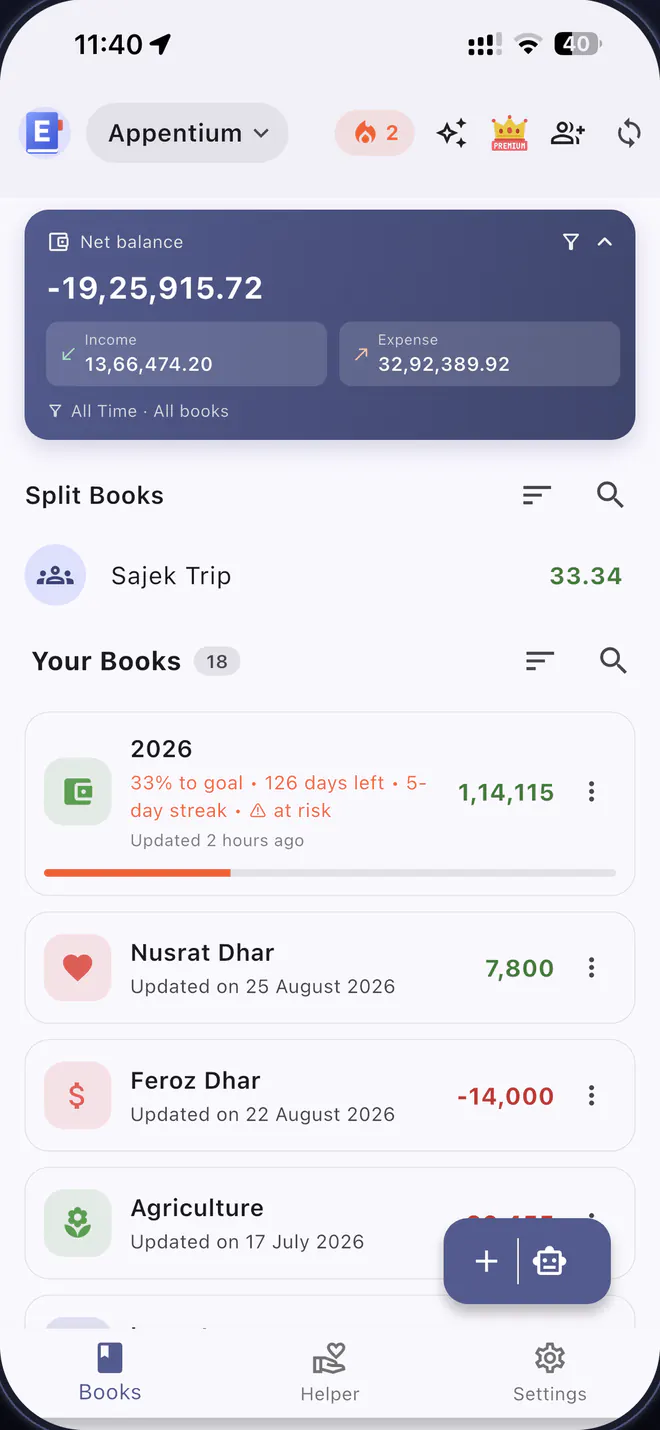
The Expenseum books screen on iPhone, showing a net balance card, a shared split book and a list of personal books with balances and goal progress.

Expensight AI“You spent 18% more on food this month.”

Split bookAlex owes you $11.11

13
Languages, right-to-left included
Books and entries, on the free plan
0
Accounts required to start
2
Stores — iPhone, iPad and Android

The entries

One app, every way you count money.

Keep a book per household, business, trip or side hustle. Each one gets its own currency, categories, budget and report — and none of them get in each other's way.

01

Unlimited books Free

Separate ledgers for home, business, travel or a shared flat. Pick an icon and colour, set the currency, reorder them however you like.

02

Entries in seconds Free

Type it, speak it, or scan it. Voice entry parses “spent 250 on fuel today”, and receipt scanning reads the amount, date and note straight off the photo.

03

Budgets & savings goals Plus

Set monthly or overall limits and get warned before you blow past them. Goals track progress, deadline and the streak that keeps you logging.

04

Categories, payment modes & custom fields Plus

Tag every entry the way your money actually works — cash, card, bKash, bank — then add your own fields for invoice numbers, clients or vehicles.

05

Recurring entries & templates Plus

Rent, salary and subscriptions post themselves on schedule. Save any entry you repeat as a template and reuse it in two taps.

06

Import & export Plus

Bring history in from CSV, and send it back out as a CSV or a formatted PDF report for any date range — handy at tax time.

07

Reminders & calendar Free

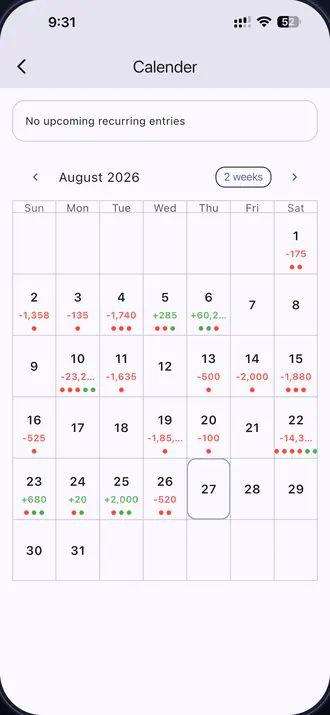
Bill reminders nudge you before the due date, and the calendar shows daily net totals plus everything recurring that's still to come.

08

Collaboration & recycle bin Plus

Invite a partner, an accountant or a co-founder to manage a book with you. Everything syncs, and deletions stay recoverable for 30 days.
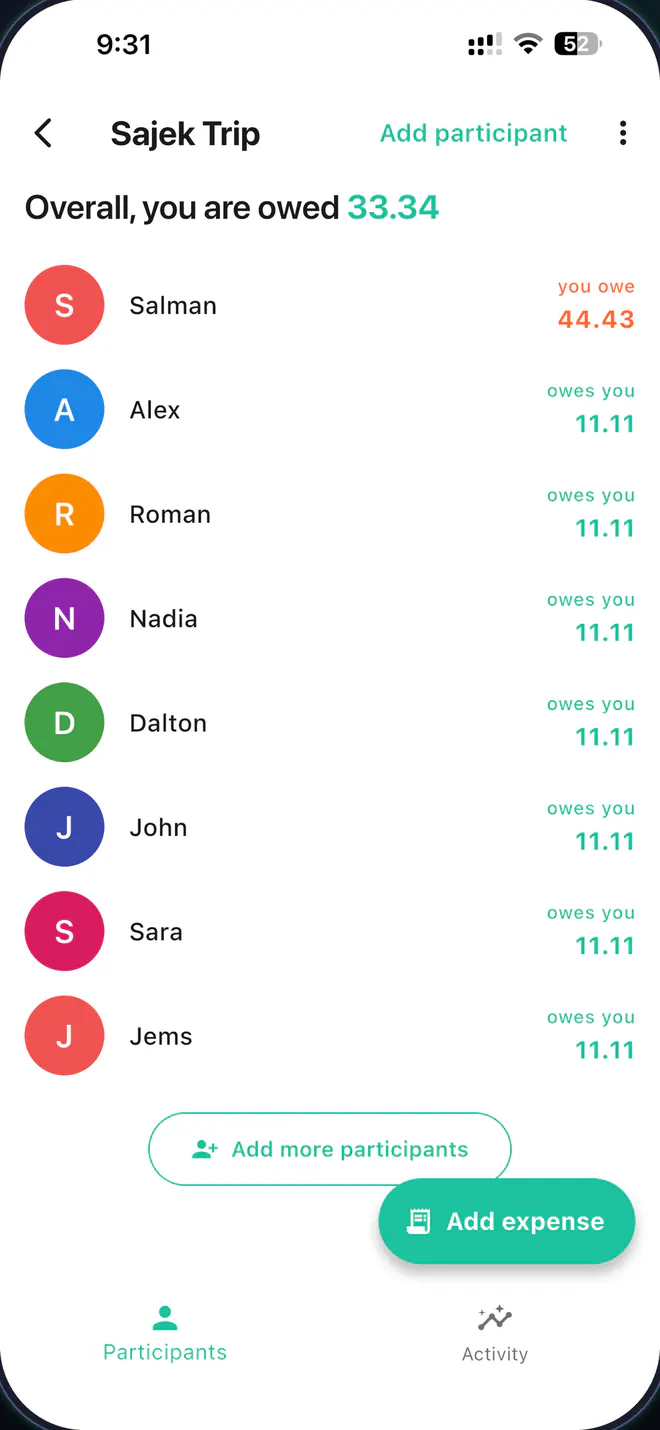
A shared trip book in Expenseum showing running balances for eight participants, with who owes you and who you owe.
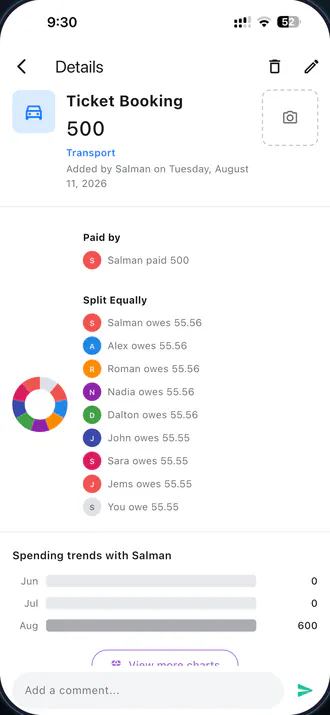
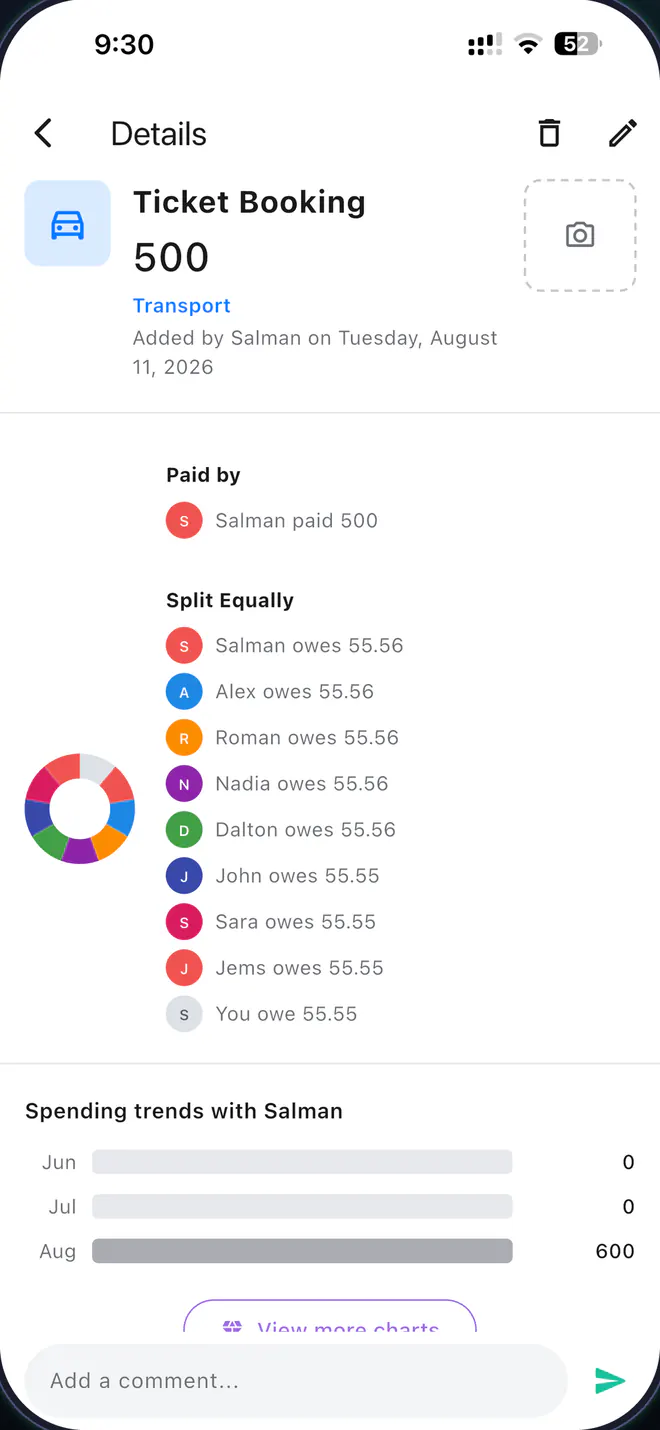
An expense detail screen breaking a 500 ticket booking into equal shares per person, with a donut chart and monthly spending trends.

Split books

Settle up without the awkward text message.

Create a split book for a trip, a flatshare or a dinner. Add who paid, choose how it divides, and Expenseum keeps a running balance for everyone in the group.
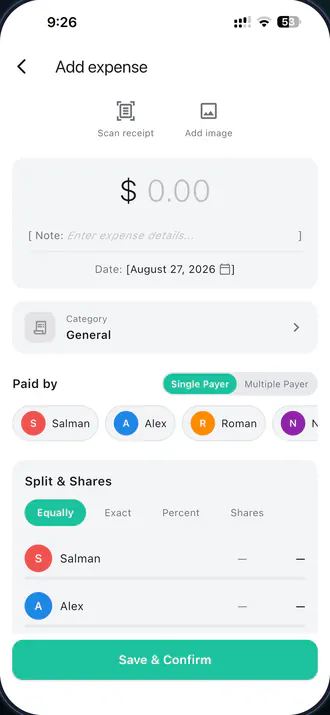
  • Equally, exact, percent or shares — with a single payer or several, so any bill divides the way the group actually agreed.
  • Invite by email. Friends who don't have the app yet still show up in the balances, and the book is waiting when they install it.
  • Gentle reminders do the chasing for you, so you never have to send “hey, about that dinner…”.
  • Receipts, comments and charts stay attached to the expense — including spending trends with each person you split with.

Start a split book →

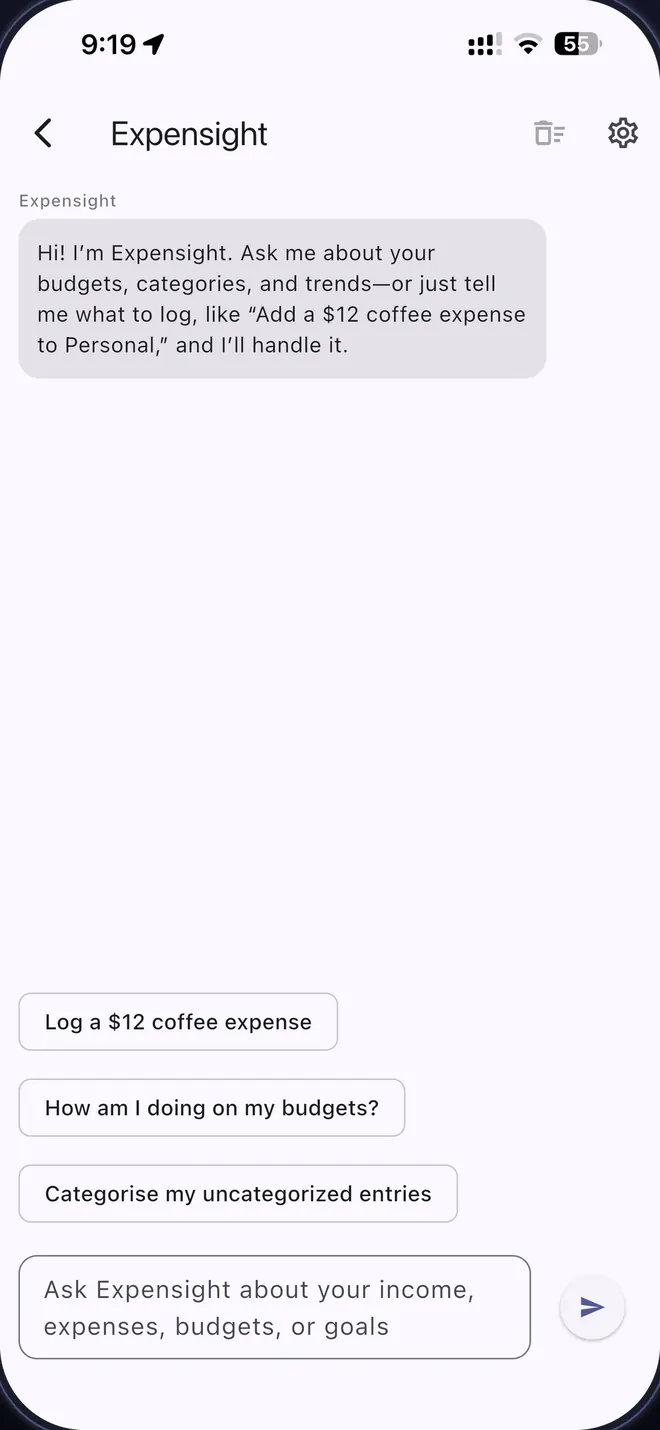
The Expensight AI assistant in Expenseum, offering prompts such as “Log a $12 coffee expense” and “How am I doing on my budgets?”.

Expensight AI

An assistant that has actually read your books.

Ask in plain language — in any of the 13 supported languages — and get answers grounded in your own entries. Then let it do the typing for you.
  • You choose what it can touch. Read-only, log transactions and categories, or full access — switched any time in Settings.
  • Confirm before changes is on by default. Nothing is written to a book until you approve it.
  • Real answers, not guesses — totals, comparisons, outliers, and a straight reply to “where did it all go this month”.
  • It stays shut until you open it. If you never use the assistant, none of your book data is ever sent for AI processing.

See what Plus unlocks →

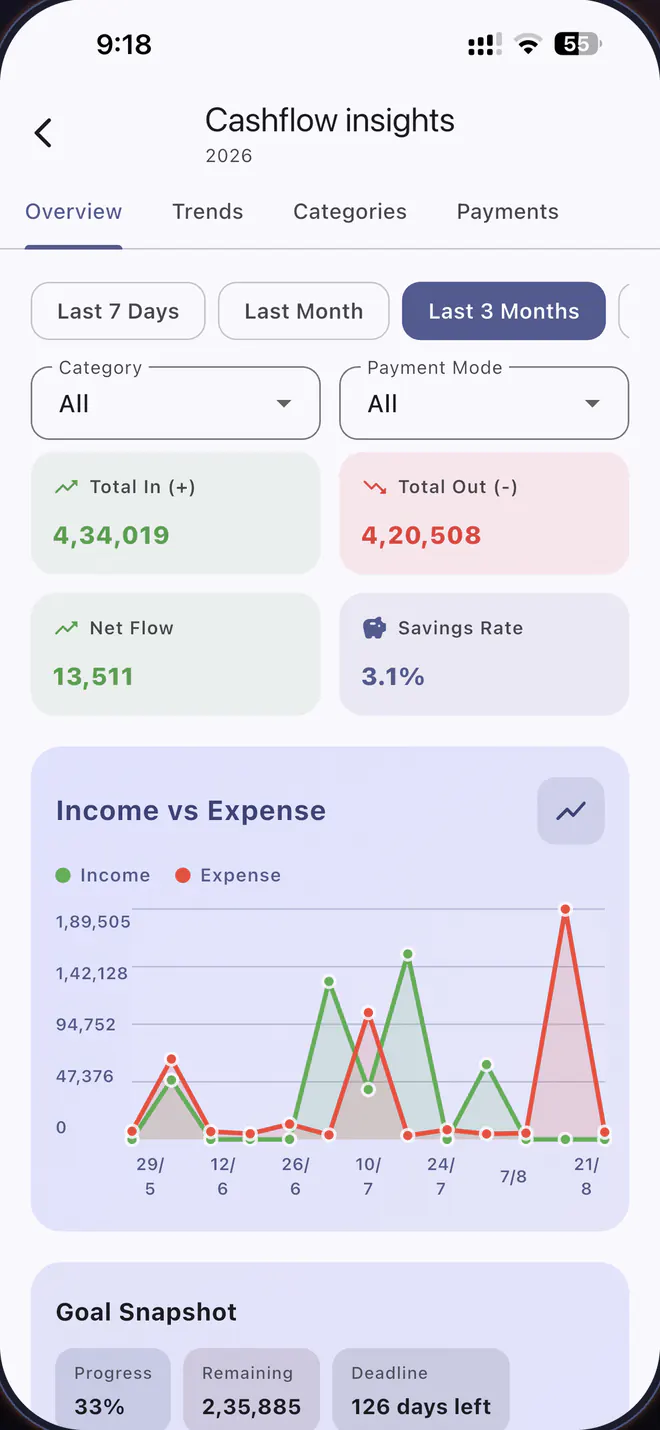
Cashflow insights in Expenseum: total in, total out, net flow and savings rate, above an income-versus-expense chart for the last three months.
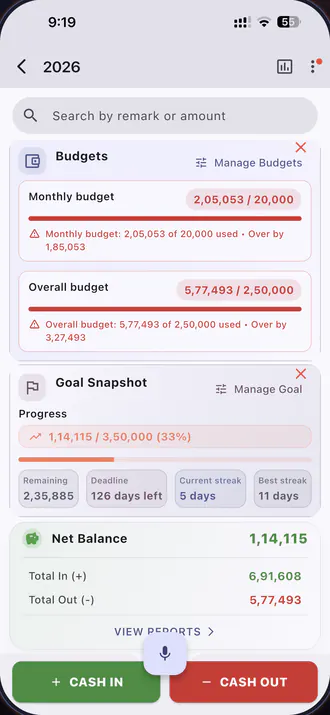
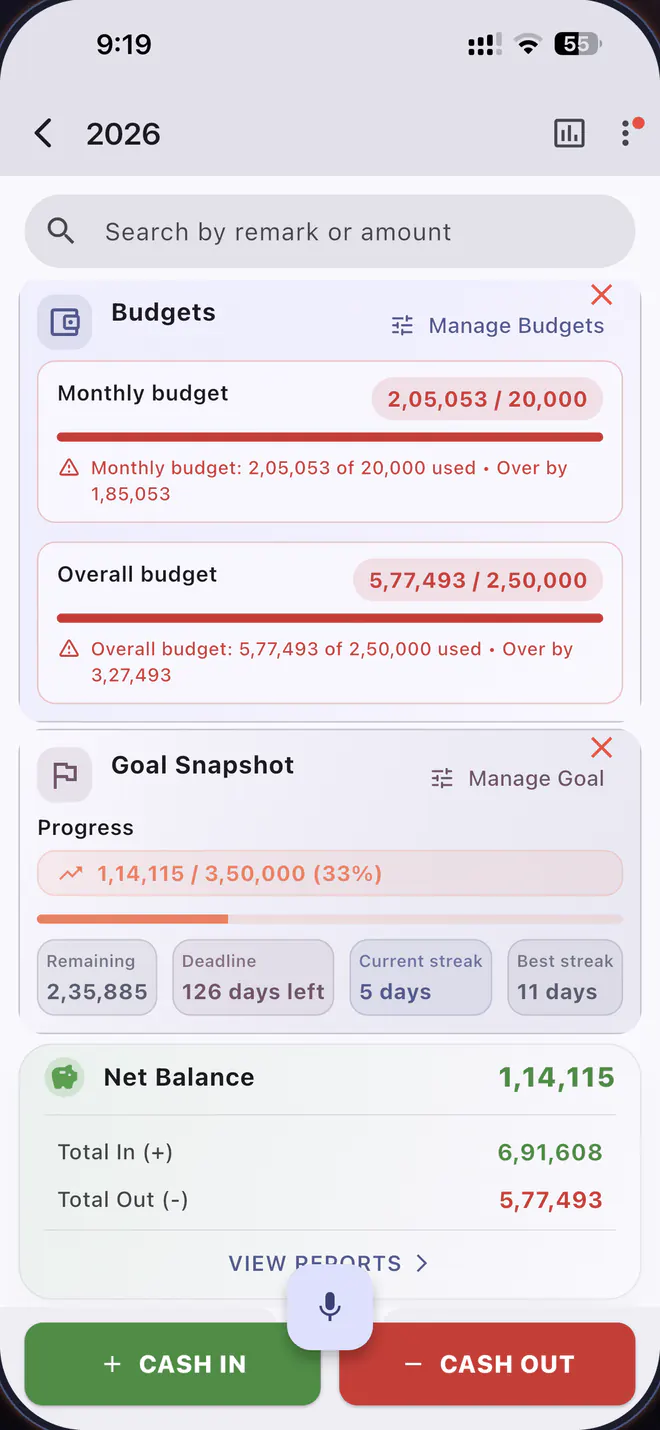
Budget and goal cards in Expenseum showing a monthly budget over its limit and a savings goal at 33% with a five-day logging streak.

Beyond the ledger

The part where numbers start telling you things.

Expenseum reads the books you already keep and turns them into direction — what's coming, what's drifting, and what to do about it.

  • Cashflow insights — income against spending over any period, broken down by category and payment mode.
  • Spending forecast — see where the month is heading before it gets there, and get told early when a book is on track to blow its budget.
  • Net worth & debt payoff — assets and liabilities in one place, and a plan for what to clear first.
  • Subscription tracker and Wrapped — every recurring charge in one list, and your year with money as a story worth sharing.

A look inside

Screens, not slogans.

Every screenshot below is the shipping app — the same build that's on the App Store and Google Play today.
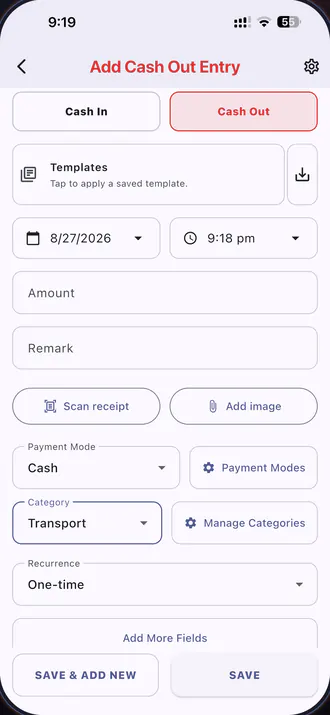
Adding a cash-out entry in Expenseum, with templates, receipt scanning, payment mode, category and recurrence.
Fast entryTemplates, receipt scanning, recurring entries and your own custom fields.
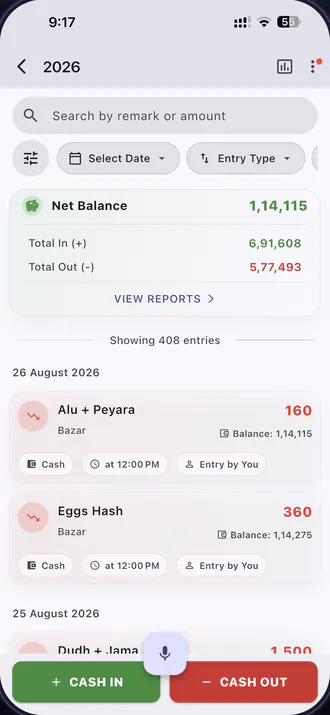
A book in Expenseum with a search field, date and entry-type filters, a net balance card and a dated list of entries.
Search & filterFind any entry by remark or amount, then filter by date, type, category or payment mode.
Adding a shared expense in Expenseum, choosing who paid and whether to split equally, by exact amount, by percent or by shares.
Split & sharesOne payer or several — divide any bill exactly the way the group agreed.
Expenseum's calendar view for August, showing a daily net total and activity dots on each date.
Calendar viewDaily net totals plus every upcoming recurring entry, laid out day by day.
Monthly and overall budget bars in Expenseum, both over their limit, above a goal snapshot with progress and streaks.
Budgets & goalsMonthly and overall limits, goal progress, and a streak that keeps you honest.
A shared expense in Expenseum broken into equal shares for nine people, with a donut chart and per-person spending trends.
Every share, shownSee each person's cut of an expense, plus spending trends with each friend.

Your data

Kept on your phone. Backed up on your terms.

Expenseum is offline-first: your books live in a database on your own device, and the app keeps working on a plane, on the metro, or with no signal at all.

Local first
Entries are written to on-device storage. No account is required to start keeping books.
Backups
Scheduled backups to your device and to your own Google Drive. The app only ever sees the files it created there.
Restore
Dated restore points with a backup history, so a bad restore is never a dead end.
Cloud sync
Only what has to be shared — split books, collaboration and the community forum — travels to the cloud.
No ads, no selling
There are no third-party advertising SDKs in the app, and we never sell your data.
In plain English
Read the privacy policy — it's short, and it says exactly what leaves your phone.

13 languages

Money talks. Pick the language it speaks.

Every screen, every label, every AI reply — fully translated, right-to-left included.

Pricing

Free forever. Plus when you want the whole thing.

The core ledger is free and stays free. Plus unlocks the automation, the intelligence and the reporting — from a single week up to a full year. Your store shows the price in your own currency.

Free

Nothing to payNo account needed

  • Unlimited books and entries
  • Voice entry and quick add
  • Calendar, bill reminders and streaks
  • Local and Google Drive backup
  • Light and dark themes, 13 languages
Download free
Most complete

Expenseum Plus

From a week to a yearCancel any time

  • 7-day pass
  • 30 days
  • 3 months
  • 6 months
  • 1 year Best value
  • Everything in Free, plus every premium feature
  • Expensight AI assistant
  • Split books & collaboration
  • Budgets, goals & cashflow insights
  • Receipt scanning & attachments
  • Recurring entries, templates, custom fields
  • CSV import, CSV & PDF reports
Get Expenseum Plus

Billed through the App Store or Google Play, which show the price in your own currency before you buy. The 7-day pass is a one-off; longer plans renew until you cancel. Terms.

🎁 Give 7 days, get 7 days. Share your referral code — when a friend redeems it, you both get a week of Plus.

Questions

Before you download.

Is Expenseum on iPhone and Android?

Both. Expenseum is on the App Store (opens in a new tab) for iPhone and iPad, and on Google Play (opens in a new tab) for Android. It's the same app, the same features and the same books on either platform.

Do I need an account to use Expenseum?

No. You can install the app and keep books straight away — everything is stored on your device. You only sign in when you want Google Drive backup, split books, collaboration, the community forum or Plus.

Does it work offline?

Yes. Expenseum is offline-first, so adding entries, budgets, reports and charts all work with no connection. Shared features sync the next time you're online.

How much does Expenseum cost?

The app is free, with unlimited books and entries. Expenseum Plus unlocks the premium features and comes in five lengths: a 7-day pass, 30 days, 3 months, 6 months or a year. Pricing is set per country, so the App Store or Google Play will show you the exact amount in your own currency before you buy.

Can I move my books to a new phone — or between iPhone and Android?

Yes. Back up to Google Drive or to a file on your device, install Expenseum on the new phone, and restore from the backup history. Restore points are dated, so you can pick exactly which one you want. The backup format is the same on both platforms.

What does Expensight AI do with my transactions?

When you send a message, the relevant parts of your books go to Google's Gemini API to generate a reply. It only runs when you open the assistant, it starts in read-only mode, and “confirm before changes” means it can't write anything without your approval. Details are in the privacy policy.

How is Plus billed, and how do I cancel?

Through the App Store or Google Play, depending on where you bought it. The 7-day pass is a one-off purchase; the longer plans renew until you cancel. Cancel from Settings → your name → Subscriptions on iPhone, or Google Play → Subscriptions on Android — cancelling stops the next renewal and Plus stays active until the period ends.

What happens to my books if I stop paying for Plus?

Nothing is deleted. Your books, entries and history stay exactly where they are — the Plus-only features simply lock, and unlock again if you resubscribe.

Does Expenseum connect to my bank?

No. Expenseum never asks for bank credentials and never links to an account. You enter what you want to track — by typing, speaking or scanning a receipt — which is also why it works with cash, mobile money and any currency you like.

I deleted something by accident.

Check the Recycle Bin. Items deleted by you or a collaborator stay recoverable there for 30 days.

Balance carried forward

Start your first book tonight.

It takes about a minute — and by the end of the month, you'll know exactly where it all went.

FREE · iPHONE · iPAD · ANDROID · 13 LANGUAGES · NO ACCOUNT NEEDED